This guide outlines the steps to create and process a Sales Commission Fee using the Sales Trust module, including configuration, ledger entry, and payment processing. These steps can only be actioned by users with Trust Accountant access.
1. Configure Sales Commission Fee Type
Before creating the fee, ensure the sales commission fee parameter is set up in the system configuration.
Steps:
- Navigate to Configuration > System Configuration.
- Select the Parameter Type: SUNDRYTYPE.
- Click Add New Parameter.
- In the pop-up window, enter:
- Parameter Code: COMMISSION
- Parameter Description: Commission
2. Create Sales Commission Fee
Once the parameter is configured, you can create the sales commission fee on the relevant ledger.
Steps:
- Go to Sales Trust > Manage Ledger.
- Select the relevant Ledger from the drop-down selection.
- Under the Commission section click on the Edit Pencil then enter:
- Asking Price
- Sale Price
- Settlement Date
- Commission Type:
- Fixed Amount – Enter the agreed amount.
- Percentage – Enter the percentage.
- Fixed Tier
- Incremental Tier

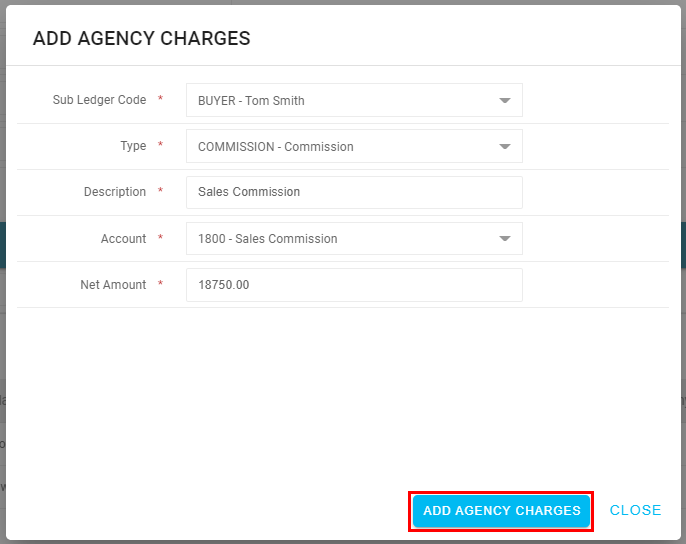
- Click Calculate. A Pop-up Window will appear to complete the following:
- Sub-Ledger Code: Select from the drop-down where the commission is to be paid from, e.g. Purchaser/Seller
- Type: Choose the sundry fee created (e.g. Sales Commission).
- Description: Enter a relevant transaction description.
- Account: Select the appropriate account code.
- Net Amount: This is automatically calculated based on the selected commission type and sales price if this is based on a percentage.
- Click Add Agency Charges.
The Sales Commission Fee will now appear under the Agency Charges section of the sub ledger, ready for payment:

3. Create Payment for Sales Commission Fee
Processing the sales commission fee follows the standard sales trust procedure for fee collection by creating a payment run.
Steps:
- Navigate to Accounts Payable > Create Payments.
- Select the Payment Type as either Owners Run or Agents Payment.
- Leave the Payment Run Date as today's date.
- Select the relevant ledger using the Property filter.
- Click Update Properties.
- Ensure the sales commission fee is ticked for payment.
- Click Process.
- Follow the next steps to finalise the payment run:
Was this article helpful?
That’s Great!
Thank you for your feedback
Sorry! We couldn't be helpful
Thank you for your feedback
Feedback sent
We appreciate your effort and will try to fix the article