A Sundry receipt will raise an invoice transaction and allocate funds to this invoice. Once receipted, these funds will be available to utilize in the property immediately.
This option should be used in scenarios such as:
- Owner Contributions
- Insurance Claims
- Sales Deposits
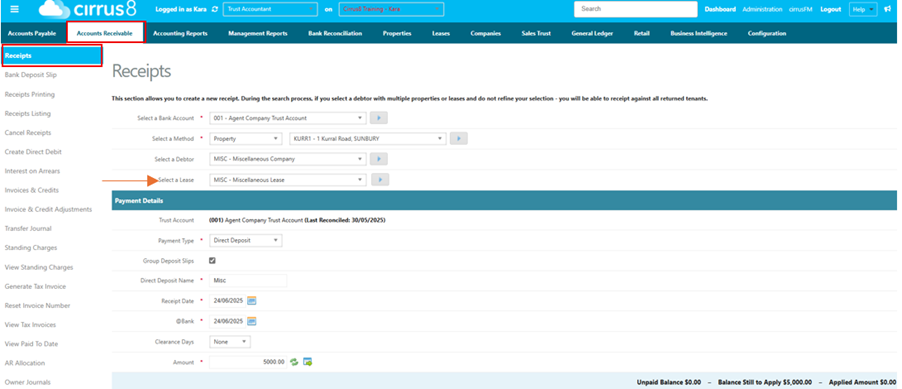
Accounts Receivable > Receipts
- Select your property
- Select Misc Lease in property
- Enter in the payment details including funds received in amount section
4. Select Add credit/ Sundry Receipt

5. Select account code 10031
6. Change description to Funds Received by Owner
7. Leave tax as GST Free
8. Select Sundry Receipt
9. Input amount and Add as the new Save button
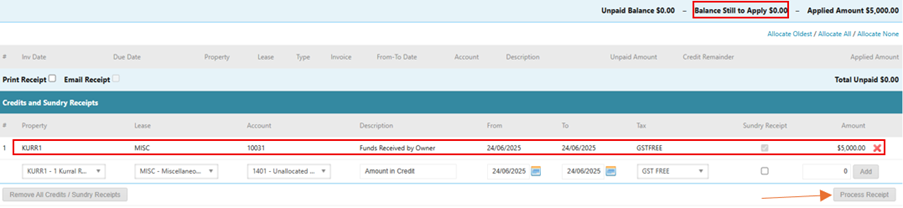
Your balance still to apply will be $0.00 so you can now process this receipt.
Was this article helpful?
That’s Great!
Thank you for your feedback
Sorry! We couldn't be helpful
Thank you for your feedback
Feedback sent
We appreciate your effort and will try to fix the article