Miscellaneous (MISC) Lease
Each property in Rex Cirrus8 should have a MISC (Miscellaneous) Lease configured.
A MISC Lease is a dummy, vacated lease used for various accounting purposes, including:
Recording and receipting Owner Contributions.
Recording and receipting Insurance Claims.
Journalling funds between properties belonging to the same owner.
Calculating Owner Contributions towards Variable Outgoings (VO) for budgeting purposes.
How to Create a MISC Lease
A user with Trust Accountant access can create a MISC Lease by following these steps:
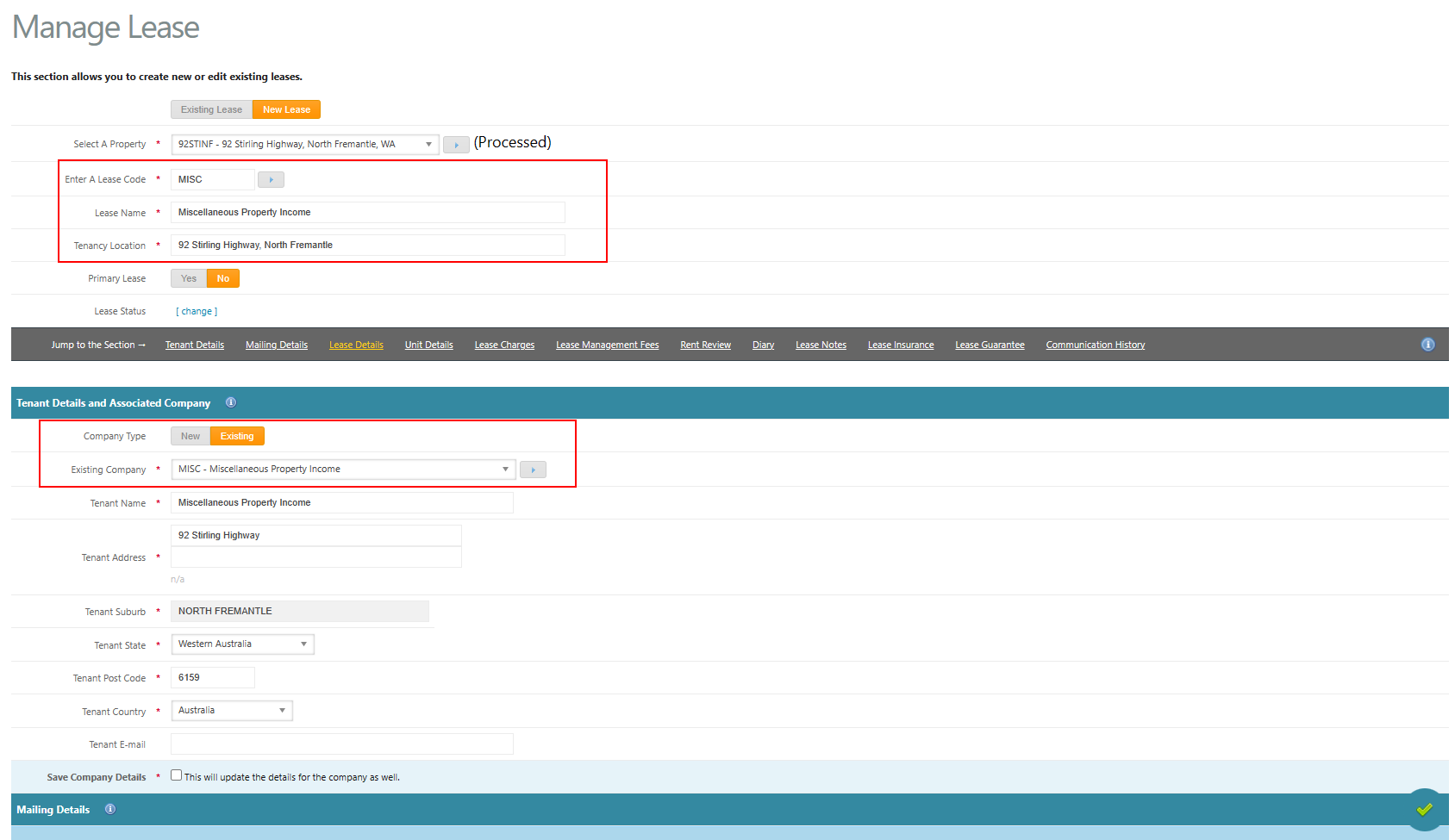
Navigate to Leases → Manage Lease → New Lease.
Select the Property requiring the MISC Lease.
Enter the following details:
Lease Code: MISC
Lease Name: Miscellaneous Property Income
Tenancy Location: Property address
Tenant Company: MISC (select the existing company record).
Select Save (green tick) to create the lease.
Important: A MISC Lease should be created for each new property and maintained as a vacated lease for miscellaneous accounting transactions.
Was this article helpful?
That’s Great!
Thank you for your feedback
Sorry! We couldn't be helpful
Thank you for your feedback
Feedback sent
We appreciate your effort and will try to fix the article