This function can be accessed as a Trust Accountant user under Accounts Receivable > Create Direct Debit. This article covers how to configure a tenant for direct debit and how to process a direct debit payment.
Configure a Tenant for Direct Debit
Firstly, you will need to ensure the Debtor (Tenant) company has been set up with the approved bank account to debit funds from.
The Debtor Company setup will need to look like the below, ensuring the EFT Banking Details are detailed and the company is marked as Direct Debit: Yes
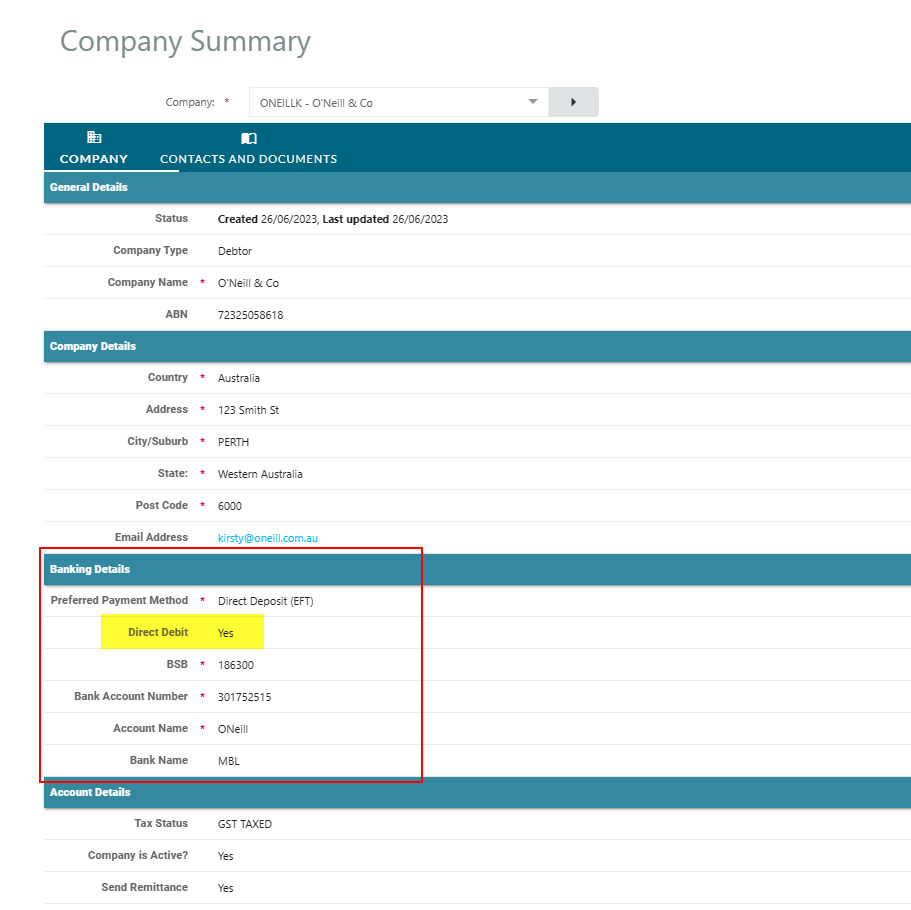
If the Debtor Company Banking Details have not been entered, the Company EFT bank account details need to be updated. Please refer to the article Changes To Banking Details
If this has not been set up as yet, you will need to update the company's bank account details - See: Change Company Banking Details
Process Tenant Direct Debit
When you are ready to process your tenant's direct debit, as a Trust Accountant user navigate to Accounts Receivable > Create Direct Debit and select the following details:
- Balance based on - Select the balance based on either Transaction Date (Invoice Date) or Due Date.
- Balance as at - This will populate the amount due on each tenant's account based on the date chosen in this step
- Debit Date - The date amount is to be debited from tenant's accounts
- Description - Description to be detailed on your trust bank statement
- Select a Bank Account: Trust Account for the direct debits to be processed
- Property - Select one or multiple properties. You can select all properties, and the system will filter out only those tenants that have been set up as Direct Debit in the company form
- Preview Details - Click this to preview the direct debit transactions in .pdf and .xlsx format before they are committed
- Generate Direct Debit File - Click this to generate two of the following files:
- ABA file to be uploaded via the direct debit facility set up through the Agency's trust bank account
- PDF file to be used for receipting funds debited from your tenant's account

Once the direct debit has been processed and funds have cleared into the Trust Account, use the PDF file to receipt these funds against the relevant tenant's accounts in Cirrus8. Please refer to the article Create Receipts.
Was this article helpful?
That’s Great!
Thank you for your feedback
Sorry! We couldn't be helpful
Thank you for your feedback
Feedback sent
We appreciate your effort and will try to fix the article