Internal Notes only. Clients must sign off on proposal that they are to utliise SMS feature. $75.00 for up to 500 SMS.
Part 1. Initial Configuration
Configuration> System Configuration> SMS

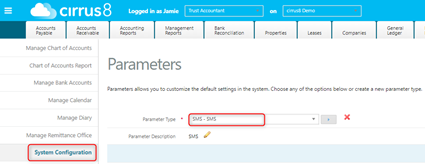
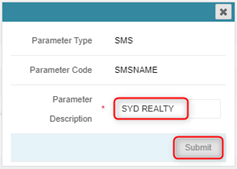
Update SMSNAME (abbreviated client name, 11 character max).
This is what appears on the recipient's phone when receiving the SMS.
Click edit icon on right:

Enter new description and click submit:
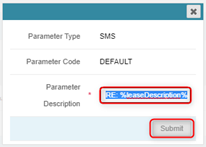
Update default SMS text, click edit icon on right:

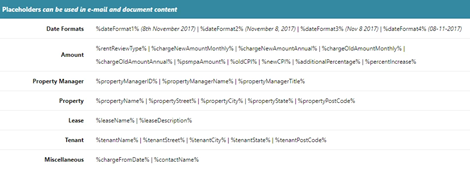
Edit script using notepad, placeholders can be used as per below:

SMS for above:

Placeholders:
and paste completed script into description and Submit
Part 2. Sending Arrears notification
Step 1: Generate Arrears Statement
PM user - Tenant Reports > Generate Arrears Statement
TA user - Accounting Reports> Generate Arrears Statement
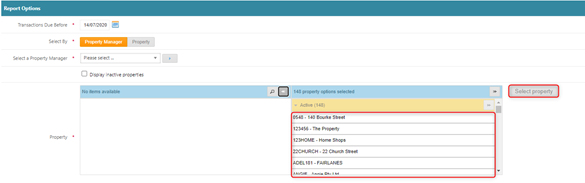
- Specify due before date.
- Use select by, select property manager, and display inactive to refine available properties
- Once property options selected confirmed, click select properties
Step 2: Configure Report Criteria
Specify Due Before Date.
Use filtering options:
Select By
Property Manager
Display Inactive (if required)
Once properties are confirmed:
Click Select Properties.
Step 3: Advanced Options
After loading completes:
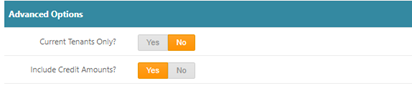
Under Advanced Options, you may:
Select Current Tenants Only
Include Credit Amounts
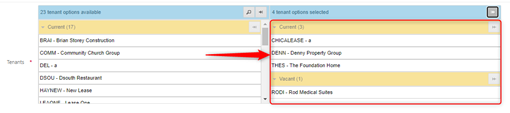
This updates the available tenant list.
Step 4: Select Tenants & Generate Report
Select required tenants from the updated list.
Click Generate Report.
Step 5: Review Arrears Results
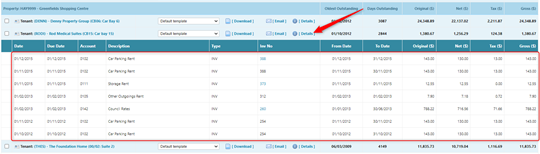
The results screen will show all tenants in arrears as of the selected date.
Before sending SMS:
Click Details to review outstanding balances.
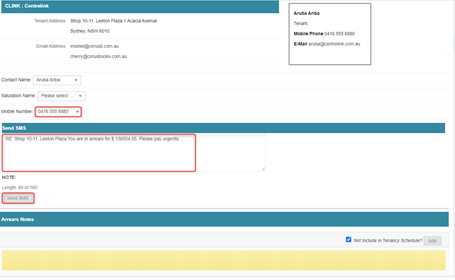
Step 6: Preview & Edit Individual SMS
Click the SMS icon next to a tenant.

In the popup window you can:
Confirm or edit mobile number
Edit SMS text
Add arrears notes
Send the SMS
Step 7: Bulk SMS Sending
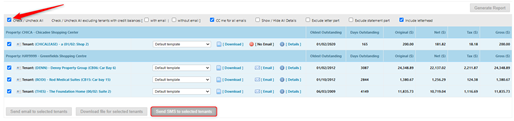
For quick bulk reminders:
Use tick boxes to:
Select All
Add or remove tenants as needed
Click Send SMS to Selected Tenants.
Was this article helpful?
That’s Great!
Thank you for your feedback
Sorry! We couldn't be helpful
Thank you for your feedback
Feedback sent
We appreciate your effort and will try to fix the article